An operating system is the software that manages a computer’s hardware and provides the common services that every other program depends on to run. It sits between raw hardware, such as the processor, memory, storage, and network hardware, and the applications a person actually uses, handling the complicated, low-level work so that application developers do not need to rewrite the same hardware-control code for every program. Windows, macOS, Linux, Android, and iOS are all operating systems, and despite looking very different on the surface, they all solve the same core set of problems: sharing the processor among many programs, managing memory, organizing files, and controlling communication with devices.
Core Responsibilities
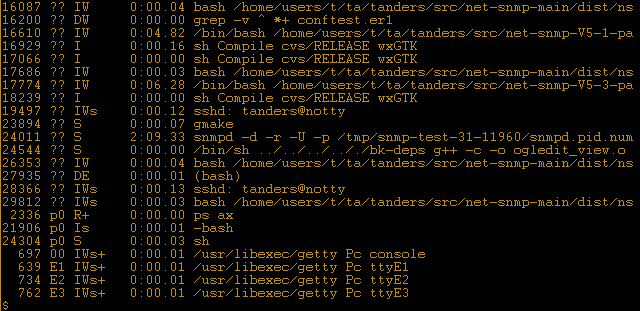
Process management is one of the operating system’s most fundamental jobs. A modern computer appears to run dozens of programs at once, but a processor core can typically execute only one instruction stream at a time. The operating system creates this illusion through scheduling, rapidly switching the processor’s attention between different running programs, called processes, often many times per second, so that each one appears to make continuous progress. A component called the scheduler decides which process gets the processor next, balancing fairness, responsiveness, and the priority a program has been given.
Memory management is equally critical. The operating system allocates a portion of the computer’s memory to each running process and prevents one process from reading or corrupting another’s memory, which is a key reason a crash in one application rarely brings down the whole system. Most operating systems use a technique called virtual memory, which gives each process the illusion of having its own large, continuous block of memory, while actually mapping that virtual memory onto the much more limited and fragmented physical memory chips, and even onto disk storage when physical memory runs short. The operating system also manages the file system, organizing data into files and folders on storage devices and controlling who or what is allowed to read, write, or execute them.
The Kernel and User Space
At the heart of every operating system is the kernel, the core piece of software that runs with full access to hardware and enforces the rules the rest of the system depends on. Application programs run instead in a more restricted environment called user space, and when an application needs something only the kernel is allowed to do, such as reading a file or sending data over a network, it makes a request called a system call, which the kernel validates and carries out on the application’s behalf. This separation is what keeps an ordinary application from being able to directly damage hardware or spy on other programs’ data.
Operating systems are generally grouped into families by how their kernels are built. A monolithic kernel, used by Linux, bundles most core services into one large program for speed and simplicity. A microkernel, used in some specialized and safety-critical systems, keeps the kernel itself extremely small and moves most services into separate, isolated processes, trading some performance for improved reliability and security. Mobile and embedded operating systems, including Android and the real-time operating systems that run inside cars and medical devices, adapt these same core ideas to tighter constraints on power, memory, and response time.
History and Modern Examples
Early computers in the 1950s had no operating system at all; an operator loaded one program at a time and the program had direct, unshared control of the entire machine. As computers became powerful enough to be worth sharing among many users and tasks, operating systems such as UNIX, developed at Bell Labs starting in 1969, introduced lasting ideas including hierarchical file systems, multitasking, and a consistent way for small programs to be combined into larger workflows. Those ideas directly shaped Linux, created in 1991, and macOS, both of which trace their technical lineage back to UNIX, while Windows developed many of its own approaches in parallel for personal computers.
Today, operating systems have spread far beyond desktop and laptop computers. Android and iOS adapt the same core scheduling and memory concepts to touchscreen phones running on battery power, where conserving energy is as important as raw speed. Cloud computing data centers run specialized operating systems optimized to host thousands of virtual machines at once, and real-time operating systems inside cars, factory robots, and medical devices guarantee that critical tasks complete within a strict time limit, sometimes measured in thousandths of a second, because a late response could be dangerous rather than merely inconvenient.
Frequently Asked Questions
Why does a computer need an operating system at all? Without one, every application would need its own code to directly control the processor, memory, storage, and every peripheral device, and no two applications could safely run at the same time. The operating system provides this shared, trusted layer so applications can focus on their own purpose instead of managing hardware.
What is the difference between the kernel and the operating system as a whole? The kernel is the core component that directly manages hardware and enforces security boundaries. The operating system is the larger package that includes the kernel plus additional software, such as a user interface, system utilities, and device drivers, that together make the computer usable.
Can a computer run more than one operating system? Yes. Many computers use dual-boot setups, where the user chooses which installed operating system to start at power-on, or virtualization, where one operating system runs an entire second operating system inside a software container called a virtual machine, letting both operate on the same physical hardware without interfering with each other.
Key facts
- An operating system shares the processor among programs through scheduling.
- Virtual memory gives each process the illusion of its own large memory space.
- The kernel has full hardware access; applications run in restricted user space.
- System calls let applications request services from the kernel.
- Monolithic and microkernel designs trade performance against isolation.
In the news
Quick checkWhat is the main job of an operating system?Show answer
An operating system manages a computer hardware, including the processor, memory, storage, and devices, and provides the shared services that let multiple applications run safely at the same time.
Sources
- Operating System Concepts (Silberschatz et al.); Linux Kernel documentation
Editorially reviewed by Specialty Digest Editorial TeamLast reviewed November 2, 2026Researched and drafted with AI assistanceReport an issue