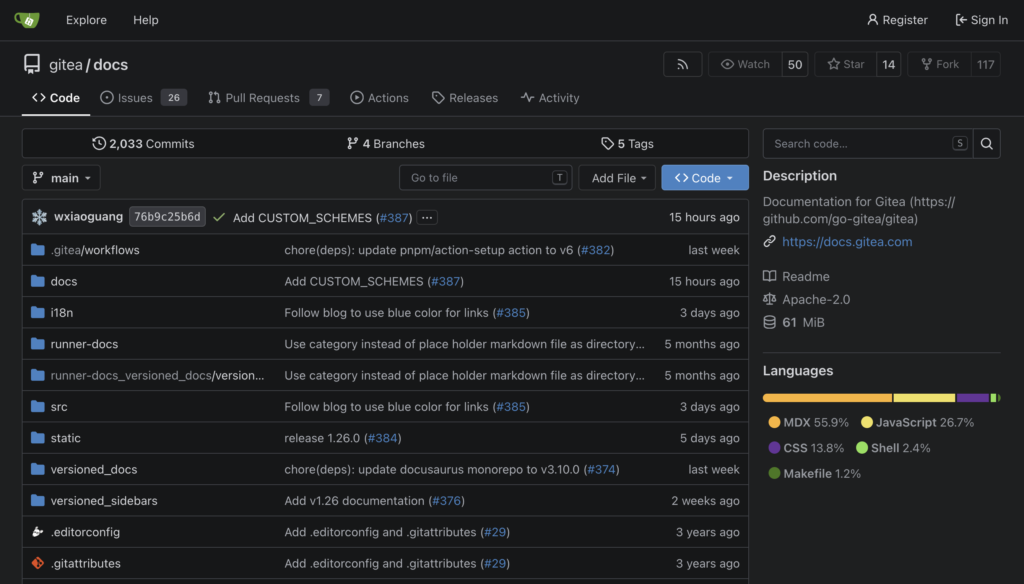
Version control is a system for tracking and managing changes to files over time, recording a complete history of exactly what changed, when it changed, and who made each change, while making it possible to retrieve, compare, or restore any earlier version whenever needed. Though version control can apply to any kind of file, it is used most heavily in software development, where it lets teams of developers work on the same codebase simultaneously without constantly overwriting one another’s work, and where a clear, permanent historical record of every change is essential both for coordinating teamwork effectively and for diagnosing exactly when and why a particular bug was first introduced.
Repositories, Commits, and History
At the center of version control is the repository, a storage location holding both the current state of a project’s files and the complete history of every previous change ever made to them. Developers save a specific, deliberate change as a commit, a saved snapshot that typically bundles together a related set of edits along with a descriptive message explaining what changed and why, building up a detailed chronological history that can later be reviewed, searched, or used to understand exactly how and why the project gradually evolved into its current state over time.
This complete history makes it possible to compare any two versions of a file to see exactly what changed between them, to revert a mistaken change by restoring an earlier known-good version, and to identify precisely which specific commit introduced a particular bug by systematically examining the project’s history, a practice that would be extremely difficult or simply outright impossible to do reliably with only a single, current, unversioned copy of a project’s files and absolutely no record of what came before it.
Branching and Collaboration
Modern version control systems support branching, which lets a developer create an independent, separate line of development, called a branch, to work on a new feature or experimental change without disturbing the main, stable version of the project that everyone else continues to rely on. Once the work on a branch is finished, reviewed, and tested, it can be merged back into the main line of development, combining the changes made on the branch with any other changes that happened on the main project in the meantime, a process version control systems are specifically designed to help automate and manage as smoothly and reliably as possible for everyone involved.
Distributed version control systems, the dominant modern approach, give every developer a complete, fully independent copy of the entire project’s history on their own computer, rather than requiring constant communication with one single central server for every single action as older, centralized version control systems once did. This design lets individual developers commit changes, examine the full project history, and create new branches entirely offline on their own machine, syncing with a shared central repository, often hosted on a dedicated code-collaboration platform, only when they are genuinely ready to share their completed work with the rest of the team or pull in everyone else’s latest changes.
From Centralized Servers to Distributed Systems
Early version control systems, developed from the 1970s onward, generally relied on a single centralized server holding the entire official history, requiring developers to stay actively connected to that server for most meaningful actions and creating a single point of failure if that server ever became unavailable or was lost entirely. These centralized systems represented a substantial improvement over no version control at all, which many teams had previously managed with informal, error-prone practices like manually copying and renaming entire folders to preserve old versions of a project.
The introduction of distributed version control systems in the mid-2000s, most notably Git, created originally to manage the Linux operating system‘s own enormous and fast-moving codebase, represented a major shift by giving every developer their own complete copy of a project’s full history. This approach proved dramatically more resilient, flexible, and well suited to the kind of large-scale, loosely coordinated collaboration common in open-source software development, and Git in particular has since become the dominant version control system used across the software industry, commonly paired with dedicated hosting platforms that add code review, issue tracking, and other collaboration features built directly on top of the underlying version control system itself.
Frequently Asked Questions
Why is version control so important for software development teams? It lets multiple developers work on the same codebase simultaneously without overwriting each other’s work, provides a complete historical record for diagnosing when and why bugs were introduced, and makes it possible to safely experiment with new features on a separate branch without risking the stability of the main project.
What is the difference between a commit and a branch? A commit is a single saved snapshot of a specific, deliberate set of changes along with a descriptive message, while a branch is an entire independent line of development containing a whole sequence of commits, allowing work to proceed separately from the main project until it is ready to be merged back in.
What is distributed version control, and how is it different from older systems? Distributed version control gives every developer a complete, independent copy of a project’s entire history on their own computer, letting them work offline and sync with others only when needed, unlike older centralized systems that required constant communication with a single central server for nearly every action.
Key facts
- Version control records a complete history of changes in a repository.
- A commit is a saved snapshot of a specific set of changes with a descriptive message.
- Branching lets developers work on new features without disturbing the main project.
- Merging combines changes from a branch back into the main line of development.
- Distributed version control gives every developer a full, independent project history.
Quick checkWhy does version control matter so much for software development teams?Show answer
It lets multiple developers work on the same code simultaneously without overwriting each other, keeps a complete history for diagnosing when and why bugs were introduced, and allows safe experimentation on separate branches without risking the stable main project.
Sources
- Pro Git (Chacon & Straub); Git official documentation
Editorially reviewed by Specialty Digest Editorial TeamLast reviewed November 2, 2026Researched and drafted with AI assistanceReport an issue