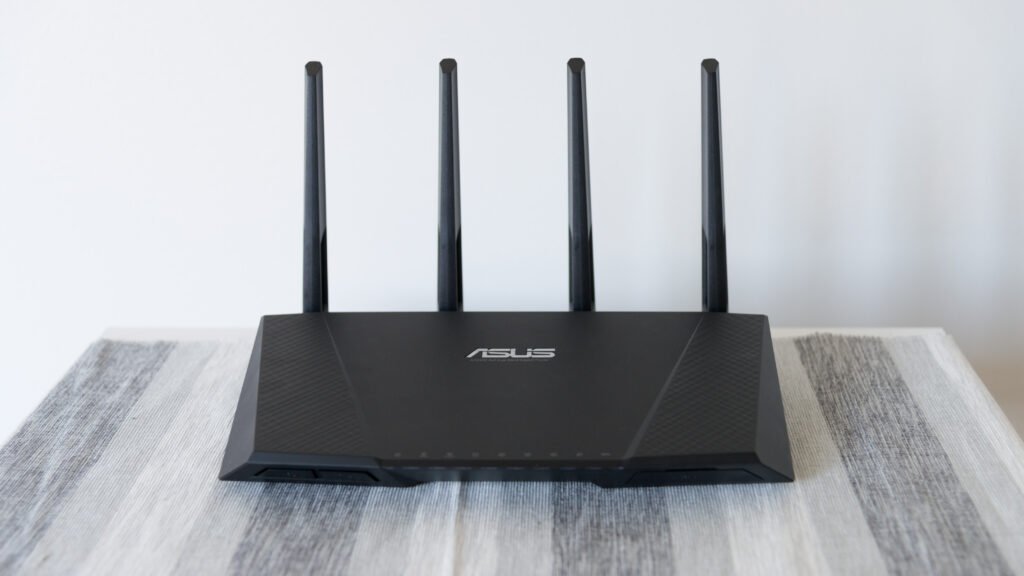
A router is a networking device that forwards data packets between different computer networks, deciding the best path for each packet to reach its destination. In a typical home, a router sits between a local network of devices, such as laptops, phones, and smart speakers, and the wider internet, managing traffic in both directions: carrying requests from home devices out to websites and services, and directing the responses back to the correct device inside the home. Without routers connecting individual networks together, the internet would simply be a collection of isolated local networks with no practical way for data to travel between them at all.
How Routing Decisions Get Made
Every packet that passes through a router carries a destination IP address in its header, and the router consults an internal routing table, a list that maps ranges of addresses to the specific network connection, or interface, that leads toward them, to decide where to send the packet next. A router does not need to know the complete path a packet will take all the way to its final destination; it only needs to know the single best next step, called the next hop, and relies on every other router along the way to make its own next-hop decision correctly. This hop-by-hop approach is what allows the internet to scale to an enormous size without requiring any central authority to plan every possible route in advance.
Routers build and update their routing tables using routing protocols, specialized sets of rules that let neighboring routers share information about which networks they can reach and how efficiently. Some protocols are designed for use within a single organization’s network, prioritizing fast convergence when a connection fails, while other protocols, most notably the Border Gateway Protocol, govern how massive networks operated by different internet service providers and organizations exchange routing information with one another across the broader internet, effectively acting as the system that holds the global internet’s many independent networks together into one connected whole.
Home Routers and Enterprise Routers
The small box most people call a home router is actually several devices combined into one: a router that handles the actual job of directing traffic between the home network and the internet service provider, a switch that connects multiple wired devices within the home, a wireless access point that provides Wi-Fi connectivity, and often a firewall that filters out unwanted or malicious incoming traffic. Larger organizations and internet service providers use dedicated, much more powerful routers, sometimes handling millions of packets per second across many high-speed connections, built specifically for routing and generally lacking the extra consumer convenience features bundled into a typical home device.
Modern routers also commonly perform a function called network address translation, which lets every device on a home or office network share a single public IP address when communicating with the wider internet, while each device keeps its own private address for communication within the local network. This arrangement conserves the limited supply of public IPv4 addresses and adds a modest layer of protection, since devices inside the network are not directly addressable from the internet without the router specifically allowing it.
From Specialized Hardware to Everyday Appliance
The earliest routers emerged from research in the 1970s and 1980s aimed at connecting different experimental computer networks together, and for years routing remained a specialized function performed by expensive, dedicated hardware used mainly by universities, large companies, and early internet service providers. As home internet access spread through the 1990s and 2000s, manufacturers began bundling routing functions together with Wi-Fi access points, wired switches, and basic firewalls into a single affordable consumer device, transforming the router from a piece of specialized infrastructure into a standard household appliance that most people set up themselves with minimal technical knowledge.
Modern routers continue to gain new capabilities, including mesh networking systems that use multiple coordinated router units placed throughout a home to eliminate dead zones, built-in parental controls and traffic prioritization features, and increasingly capable software that can automatically adjust settings to maintain a stable connection as the number and type of connected devices in a typical household continues to grow, from computers and phones to smart appliances, security cameras, and other internet-connected devices.
Frequently Asked Questions
What is the difference between a router and a modem? A modem connects a home network to an internet service provider’s infrastructure, converting signals between the format used on the provider’s line and the format used by home networking equipment. A router then takes that internet connection and distributes it among multiple devices on the local network, directing traffic to the correct device; many consumer devices combine both functions in a single unit.
How does a router decide the fastest path for data? Routers evaluate available paths using criteria defined by their routing protocol, which may include the number of intermediate hops, the speed or congestion of each connection, and administrative preferences set by network operators, continuously updating their routing tables as conditions change so that traffic can be redirected if a preferred path becomes slow or unavailable.
Why do most home networks use network address translation? It lets every device in a household share one public IP address provided by the internet service provider, which conserves the limited pool of available IPv4 addresses and adds a basic layer of isolation and protection between devices on the home network and the broader public internet.
Key facts
- Routers connect separate networks and forward packets based on destination IP address.
- Routing tables map address ranges to the next network hop.
- The Border Gateway Protocol governs routing between major internet networks.
- A typical home router combines routing, switching, Wi-Fi, and firewall functions.
- Network address translation lets many devices share one public IP address.
In the news
Quick checkHow does a router decide where to send a data packet?Show answer
It reads the destination IP address in the packet header and checks its routing table for the next hop, the single best next network connection toward that address, relying on other routers along the way to make their own next-hop decisions.
Sources
- Computer Networking: A Top-Down Approach (Kurose & Ross); Cisco Networking Academy materials
Editorially reviewed by Specialty Digest Editorial TeamLast reviewed November 2, 2026Researched and drafted with AI assistanceReport an issue