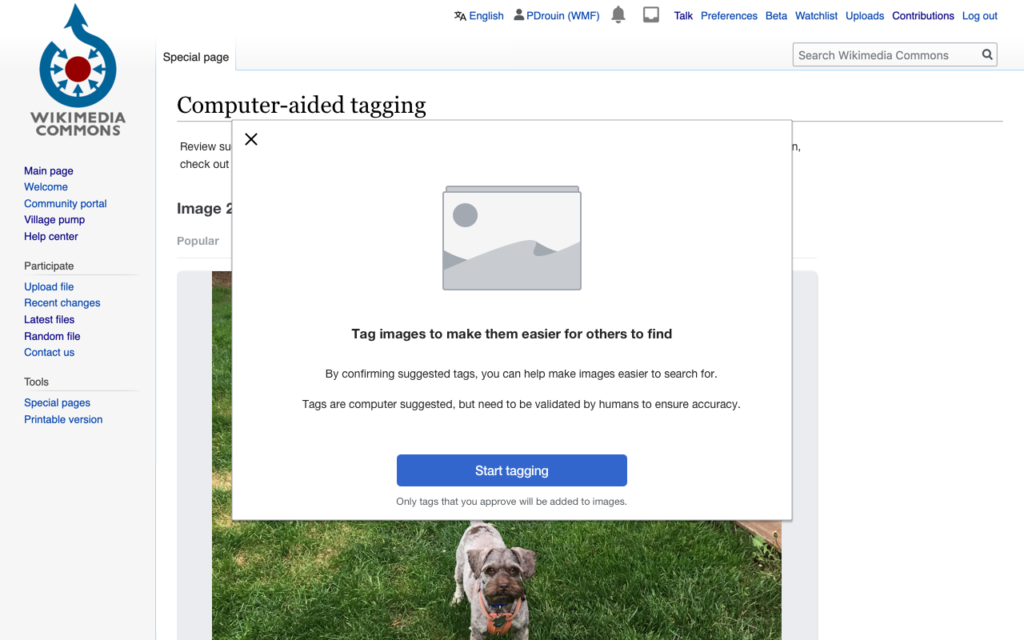
Computer-use AI describes artificial intelligence systems that operate a computer in the way a person does. Instead of calling a purpose-built programming interface, the system looks at the screen, decides what to do and then controls the cursor and keyboard to click buttons, type text and move between applications. Because it relies on the same graphical interface people use, such an agent can in principle work with software that offers no special integration for AI. The capability appeared in commercial products in late 2024 and early 2025 [1][2].
Overview
Most software automation has depended on application programming interfaces (APIs) or on scripts written for a specific page layout. Both approaches break when an interface changes or when no API exists. Computer-use AI takes a different route. It treats the screen as its input and the mouse and keyboard as its output, using a multimodal model that can interpret images together with text.
The result is a general-purpose kind of AI agent. In principle, any task a person can finish on a screen, such as filling in a form, comparing prices across websites or moving data between two applications, is within reach. In practice, reliability is still the main limit.
How it works
A computer-use agent runs in a loop that repeats until the task ends.
- Observe. The system captures a screenshot of the current screen, sometimes with extra information such as the page structure.
- Reason. A model examines the screenshot and the goal, and decides on the next action. This often involves chain-of-thought style planning.
- Act. The system issues a low-level command such as move the cursor to a coordinate, click, type a string, press a key combination or scroll.
- Check. A new screenshot shows the result, and the model decides whether the step worked, whether to retry or whether the task is complete.
The model must solve several hard problems at once. It has to read text and recognize interface elements, locate them precisely on the screen, remember what it has already done, and recover when something unexpected appears, such as a pop-up. It relies on advances in vision-language models, reinforcement learning and autonomous planning.
Deployment setups
Computer-use systems run in different environments.
- Virtual machines or containers. The agent operates a sandboxed desktop, which limits the damage a mistake can cause. Developers commonly recommend this arrangement.
- Browsers. The agent controls a web browser, which covers a large share of everyday tasks.
- A user’s own computer. The agent works in the person’s real applications, often with limits on which apps it may touch.
Many products combine this approach with structured tools. When a direct integration exists, such as one built with the Model Context Protocol, it is usually faster and more reliable than clicking through an interface, so an agent falls back on screen control only when needed.
Evaluation
Researchers measure these agents with benchmarks that place them in realistic software environments. OSWorld, for example, provides tasks across real operating systems and applications and checks whether the final state is correct [3]. Results from such benchmarks have shown that agents once performed far below human level, and that scores have risen quickly as models and training methods improved. Scores differ between benchmarks and versions, so a single figure should be read with care, and readers should consult the benchmark’s current leaderboard.
Applications
- Office tasks. Entering data between systems, filling forms and updating spreadsheets.
- Web research and shopping. Navigating several sites, comparing options and collecting results.
- Software testing. Exercising an application’s interface the way a user would.
- Legacy systems. Operating older programs that have no modern interface for automation.
- Accessibility. Helping people who find some interfaces hard to use, although this area needs careful design.
These uses overlap with robotic process automation, an older field based on fixed scripts. The new approach is more flexible, though also less predictable.
Limitations
- Accuracy. Agents can misread the screen, click the wrong element or lose track of their progress in long tasks.
- Speed and cost. Each step needs a model call and a screenshot, so tasks can be slow and costly compared with direct API calls.
- Brittleness. Unusual layouts, moving elements, CAPTCHAs and login steps can block an agent.
- Context limits. Long tasks fill the context window with screenshots, which may require summarizing or memory techniques.
Safety and security
Giving a model control of a computer raises serious risks. Developers warn that the agent can take actions with real consequences, such as sending an email or deleting a file, and that it may make mistakes. A central concern is prompt injection: text on a web page or in a document can contain instructions that try to redirect the agent, and an agent that obeys them might leak data or perform unwanted actions. Common safeguards include running the agent in an isolated environment, limiting its access to accounts and sensitive data, restricting which sites it may visit, and requiring a person to confirm consequential actions, as in human-in-the-loop AI. Providers also publish usage policies and add classifiers to detect misuse.
Relationship to other concepts
Computer-use AI is one expression of agentic AI. It differs from tool calling, where a model calls defined functions, because here the action space is the general screen. It can also be a step inside an agent workflow that mixes screen control with other tools.
History and development
The idea of software that drives other software through its interface is old. Early research on graphical user interface agents, and later on robotic process automation, produced tools that replayed recorded clicks or followed rules tied to specific screen layouts. What changed in the 2020s was the arrival of large multimodal models that can read an arbitrary screenshot and decide what to do without a script written in advance. Research benchmarks such as OSWorld gave the field a shared way to compare systems, and commercial releases in late 2024 and early 2025 brought the idea to a wider audience.
Practical guidance for using computer-use agents
Organizations that try these systems usually start with narrow, low-risk tasks and expand gradually. Useful habits include giving the agent a clear and specific goal, testing it in a sandbox before connecting it to real accounts, logging every action so that work can be reviewed afterward, and setting limits on spending, time and the number of steps. Where a reliable programming interface exists, using it is normally better than controlling the screen, because it is faster, cheaper and less error-prone. Screen control is best kept for the gaps that other methods cannot fill.
FAQs
What is computer use in AI? It is the ability of an AI system to operate a computer by looking at the screen and controlling the mouse and keyboard, instead of using only a special programming interface.
How is computer-use AI different from robotic process automation? Robotic process automation follows fixed scripts and breaks when interfaces change. Computer-use AI interprets the screen with a model, so it can adapt to changes, though it is less predictable.
Is computer-use AI safe? It carries risks, including mistakes and prompt injection from untrusted content. Isolated environments, limited permissions and human approval for important actions reduce the risk.
Which companies offer computer-use agents? Several AI developers have released such systems, including Anthropic in October 2024 and OpenAI in January 2025, and others have followed.
Can computer-use AI replace APIs? Not generally. Direct integrations are faster and more reliable, so screen control is best for software that lacks them.
More in AI Agents and Autonomous Systems
Key facts
Related concepts
Quick checkWhat is computer-use AI?Show answer
Computer-use AI describes AI systems that operate a computer like a person: they look at screenshots, then move the cursor, click, type and scroll to carry out tasks in ordinary software and websites.
Sources
- Anthropic, Developing a computer use model, https://www.anthropic.com/news/3-5-models-and-computer-use
- OpenAI, Computer-Using Agent, https://openai.com/index/computer-using-agent/
- Tianbao Xie et al., OSWorld: Benchmarking Multimodal Agents for Open-Ended Tasks in Real Computer Environments, https://arxiv.org/abs/2404.07972
Editorially reviewed by Specialty Digest Editorial TeamLast reviewed November 17, 2026Researched and drafted with AI assistanceReport an issue