A strong password is long, random and used for one account only. It is not the one with a symbol, a capital letter and a number. Many websites still demand those rules, yet the current standard from the US National Institute of Standards and Technology (NIST) tells organisations not to impose them.
What does the current standard say?
NIST Special Publication 800-63B-4 governs how organisations check passwords. When a password is the only login step, it must have at least 15 characters. Organisations must not impose other composition rules, such as mixing character types, and must not require regular changes unless a password is known to be compromised. They must also reject passwords found on lists of common or leaked ones, and must allow password managers. These rules bind US federal systems; elsewhere they vary by country. The UK National Cyber Security Centre (NCSC) points the same way: it advises three random words and calls long-standing advice to use complex passwords unhelpful, because few people can memorise many of them.
NIST now requires length and blocklist checks, and prohibits mixing rules and routine forced changes. Source: NIST Special Publication 800-63B-4, Digital Identity Guidelines: Authentication and Authenticator Management (US federal systems; rules vary by country).
Why does length beat complexity?
Strength is the number of guesses an attacker would need. That number grows much faster with length than with extra symbol types. The Electronic Frontier Foundation (EFF) method picks each word at random from a list of 7,776 words, so every word multiplies the possibilities by 7,776.
Example 1: the disguised word. The password P@ssw0rd! has nine characters and four character types, yet it is the word “password” with familiar swaps. The NCSC notes that criminals know these tricks, so swapping letters for numbers does not make a password significantly stronger.
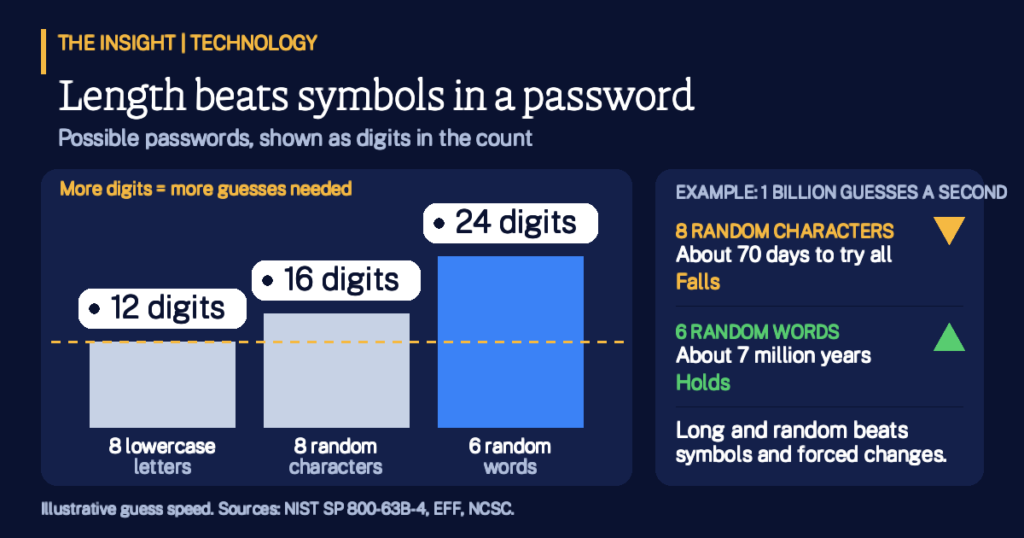
Example 2: characters versus words. Eight random keyboard characters, drawn from the 94 printable ones, give about 6.1 quadrillion possibilities. Six random words give about 221 sextillion, roughly 36 million times more. EFF suggests six words for most uses, and a short story helps you remember them.
Six random words give about 36 million times more possibilities than eight random keyboard characters. Source: author arithmetic (94 to the power 8; 7,776 to the power 6) using the 7,776-word list described by the Electronic Frontier Foundation, Dice-Generated Passphrases.
Where do the guesses really happen?
An attacker has two routes. Online, they type guesses into the login page, and NIST requires services to allow no more than 100 failed attempts in a row. Offline, they steal a file of scrambled passwords and guess on their own computers with no cap. EFF warns that short passwords of any kind can fall quickly in that second case. This is the less known point: password strength matters most on the day a service is breached, not at the login box.
Example 3: the guessing race. Assume, as a round and illustrative figure, one billion guesses a second. Eight random characters would last about 70 days. Six random words would last about 7 million years. Against the online limit of 100 tries, even three random words, about 470 billion possibilities, leave an attacker odds of roughly 1 in 4.7 billion.
Guess limits protect the login page; only length and randomness protect a stolen file. Sources: NIST SP 800-63B-4 (limit of 100 failed attempts); EFF, Dice-Generated Passphrases (offline risk); author arithmetic at an assumed one billion guesses per second (about 70 days and about 7 million years).
How solid is this? Well-supported: the NIST requirements, the EFF word counts and the arithmetic are published and checkable. Assumed: the guessing speed is a round figure, because real speeds depend on how a service stores passwords. Verizon’s 2026 Data Breach Investigations Report found that software vulnerabilities, at 31 percent of breaches, now beat stolen passwords as the top way in, so a password is one layer of defence, not all of it. For wider context, see security basics: goals, passwords and ciphers and the first UN treaty against cybercrime.
Key Takeaways
Choose length and randomness. A long, random phrase beats a short password full of symbols.
Use one password per account. A reused password that leaks can open your other accounts.
Let a manager remember them. Memorise one strong passphrase and let the manager hold the rest.
Change on evidence, not on a calendar. Replace a password when you suspect it has leaked.
Add a second step. Where offered, turn on a second login step, because passwords are only one layer.